Personal Tip Jars

Personal tip jars allow you to accept tips without hassle. Simply rez the tip jar and you are ready to go. But if you want to change some settings you can.
To change settings, right click on the tip jar and select edit. Go to the contents tab on the edit window and open the config notecard.
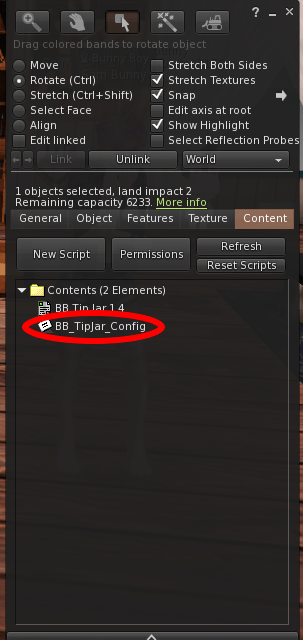
Here you can edit a few configuration options.
Price
This is the price that is displayed in the editable box when a person goes to pay the tip jar. This can be set to any integer. Default value is 100.
Pay Buttons
This is the amounts of the buttons in the pay window when a person goes to pay the tip jar. This can be set to any four integer values. There must be four values separated by a comma.
Thank You Text
This is the text that is said in local chat when someone tips the tip jar. You can set it to anything. Use $TIPPER$ in place of the tipper name in the text and the name of the tipper will be inserted there when tipped.
Hover Text
Your tip jar has hover text above it. If you don’t want to display this text, change this setting to NO.
Tip Jar Name
This is the top line of the hover text above your tip jar. You can customize this text to anything you want. If you want to display your name in the text, put $OWNER$ where your name should go. If you have selected above to not show this text, this setting does nothing.
Display Last Tip
On the tip jar hover text, when tipped, the hover text displays the last tip amount. If you don’t want to display this amount, change this to NO and that line will not be displayed at all. Will not be displayed if Hover Text setting is set to NO.
Display Last Tipper
On the tip jar hover text, when tipped, the hover text displays the name of the last tipper. If you don’t want to display this name, change this to NO. If you have already set Display Last Tip to NO then this won’t display either.
Use Particles
When the tip jar is tipped the tip jar can explode some hearts. This lasts only a few seconds. If you do not want the tip jar to do this, set to NO.
Notification
The tip jar can notify you when you receive a tip by sending you and IM. This IM includes the amount of the tip, who tipped you, and where the tip jar is. If you don’t want to receive these IMs, set to NO.
When you have updated the config file, click save and the tip jar will reset. If no errors are found in the config file, the tip jar is now good to go. You do not need to accept debit permissions as this tip jar does not send money to anyone. All money tipped to this tip jar go into your account.
 Bunny Boy