Profile Picture Tip Jars
- Main Tip Jars
- Furniture Linked Tip Jars (sit to login)
- Linked Tip Jars
- Server/Display Board
Server and Display Board
If you wish to use the display boards you will need to rez a server as well as the display board. You only need one server per tip jar system. If you have only one area in the region you only need one server. You can rez as many display boards as you want, they will all connect to the server and display the same information.
To start, rez a server. The server can be kept anywhere as long as it is in the same region as the tip jars and display boards.
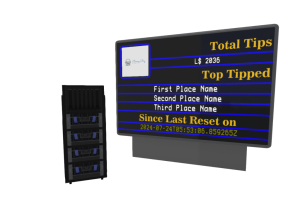
Once the server is rezzed, right click on it and click edit. Go to the contents tab and open the config notecard. There are only two settings in the config notecard.
Timer
If you want to reset your tip amounts on a regular basis, place the amount of time (in seconds) that you want the server to reset it’s totals in. You can set this to 0 to disable the auto resets and reset the amounts manually by clicking on the server and selecting Reset on the pop-up.
Server
This is the server number. This number must match the server number in the tip jars and the display board.
Once you have edited the notecard, save it and the server will reset and start. You can now set up the display boards. You can rez a display board anywhere in the same region as the server and tip jars.
After rezzing the display board, right click on it and select edit. Go to the contents tab on the edit window and open the config notecard. There are only two settings.
Server
As above, the server number must match between the server, tip jars and display board.
Logo Image
Here, enter the UUID of your logo image. This image will be displayed in the top left corner of the display board. If you don’t have a logo, or don’t want to use one, leave at 0 and the default image will be used.
When you finish editing the notecard, save it and the display board will reset. The display board will be blank after a reset until either the server is reset or a tip is placed on one of the linked tip jars.
 Bunny Boy